Configure Company Information
Before you start using Accounting in CURQ, make sure your company information is configured correctly. This information is used throughout the system, including on invoices, reports, and other business documents.
Open Company Settings
To get started with updating your company information, follow these steps:
Go to Settings.
Select Users & Companies.
Click on Companies.
Open your company record.
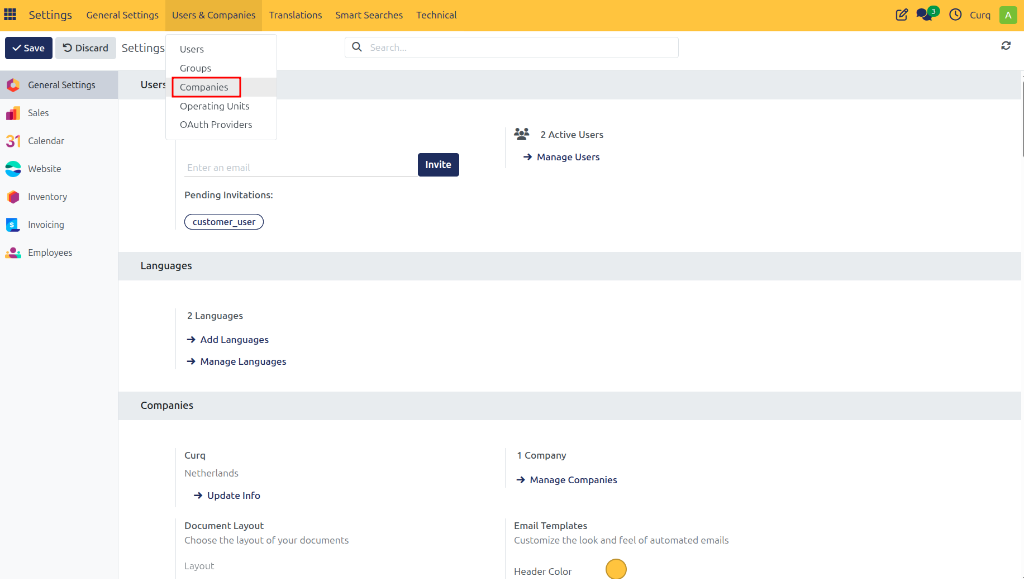
You can now review and update your company information.
Enter Basic Company Details
Ensure that all basic contact details are accurate:
Company Name
Address (Street, City, Postal Code, Country)
Phone Number
Email Address
Website
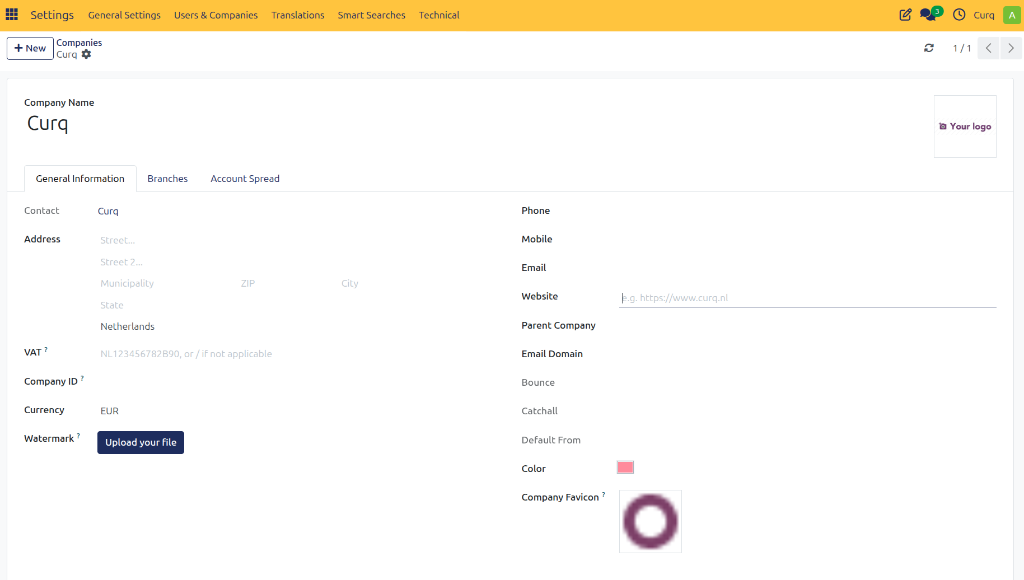
Enter Financial Information
Depending on your business requirements and local regulations, you may also need to enter:
VAT Number
Chamber of Commerce Registration Number
Tax Identification Number
Other legal registration details
These details may appear on invoices and official documents. It is important to ensure they match your official registrations exactly.
Upload Company Logo
To personalize your documents and brand your business:
Open the company record.
Upload your company logo.
Save the changes.
Your logo will be prominently displayed on invoices, quotations, and reports, giving your documents a highly professional appearance!
Verify Contact Information
Make sure all contact details are up to date so customers, suppliers, and employees can easily reach your business when needed.
Save Your Changes: CURQ automatically saves changes as you make them. There is no separate save button!