Mollie Bank Synchronization
When customers pay invoices online in CURQ—either through the webshop or the customer portal—and Mollie is used as the payment provider, payment transactions can be synchronized automatically with CURQ. These transactions are imported directly into a dedicated Mollie journal, making reconciliation faster and more efficient.
Create a Mollie Journal
Before enabling synchronization, you must create a dedicated Mollie journal.
Navigation:
Accounting → Configuration → Add a Bank Account
When creating the bank account, simply enter “Mollie” as the bank account number. CURQ automatically configures the journal with the appropriate default settings required for Mollie synchronization.
Configure Mollie Synchronization
After creating the journal:
Open the Mollie journal.
Navigate to the Bank Feeds section.
Select Mollie Synchronization as the synchronization method.
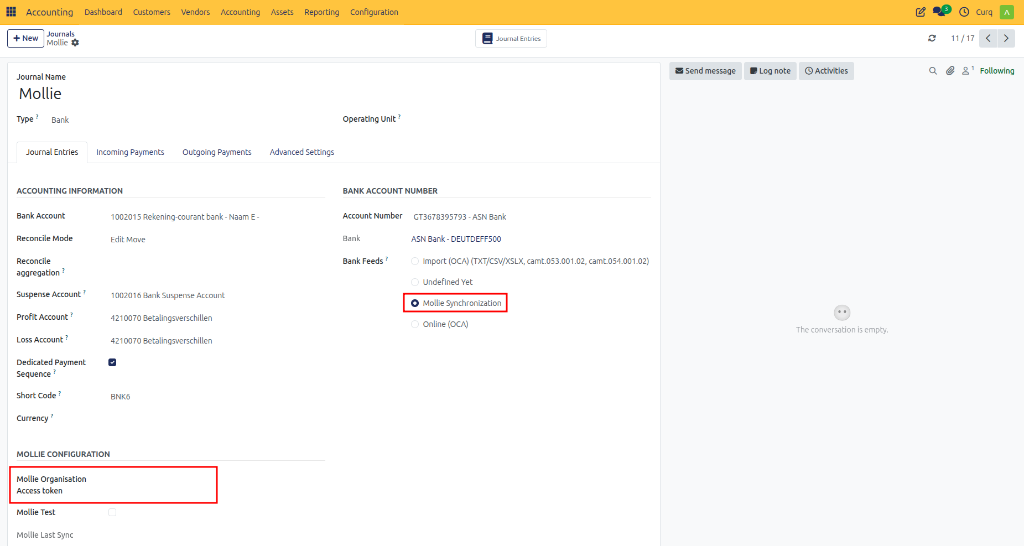
Once configured, all payments processed through Mollie will automatically appear in the Mollie journal and can be reconciled with the related invoices.
Mollie Organisation Access Token
To connect CURQ with Mollie, you must provide a Mollie Organisation Access Token.
This is not the standard Mollie Live API Key mentioned in the Mollie documentation. CURQ requires a separate Organisation Access Token.
Create an Organisation Access Token
Log in to your Mollie Dashboard.
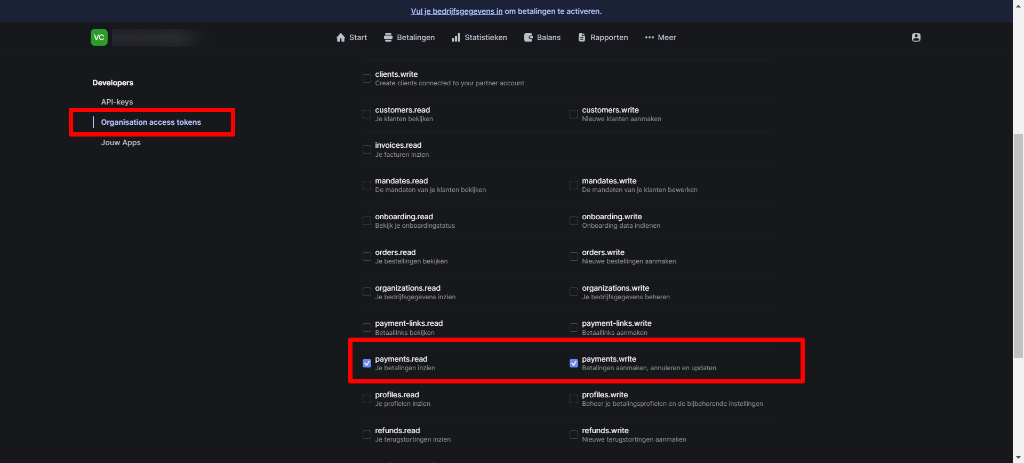
Navigate to Organisation Access Tokens.
Create a new access token.
Grant the permissions:
Payments – Read
Payments – Write
Generate the token and copy it.
Paste the token into the Mollie Synchronization settings in CURQ.
Automatic Statement Import
Once the synchronization has been configured successfully, CURQ automatically imports Mollie transaction statements on a daily basis.
This ensures that:
Mollie payments are imported automatically.
Transactions are recorded in the Mollie journal.
Payments can be quickly reconciled with the corresponding customer invoices.
Manual import of Mollie payment data is no longer required.
After the setup is complete, online payments received through Mollie are automatically synchronized and ready for reconciliation in CURQ.